

Download TallyPrime 7.1 or Older Tally Versions: Complete Download Guide
Originally published: January 22, 2010
Completely revised and updated: August 15, 2026
I originally published this page in January 2010.
At that time, people coming here were looking for one thing:
Download Tally.ERP 9.
A lot has changed since then.
Tally.ERP 9 has been succeeded by TallyPrime. GST arrived. e-Invoicing became part of everyday business. Banking became increasingly digital. Businesses started expecting accounting data on phones and browsers. And Tally itself continued evolving.
But there is another reason I decided not to remove this old page.
Thousands of businesses still have old Tally installations and historical company data.
Some need the latest TallyPrime.
Some specifically need Tally.ERP 9.
Others are trying to recover or migrate data created in Tally 7.2, Tally 6.3, Tally 5.4 or even older generations.
And surprisingly, Tally still maintains a substantial collection of previous releases and legacy migration resources on its own website — although they are not always obvious to someone visiting the main download page.
So this page now has a broader purpose:
Help you download the current TallyPrime, find older Tally versions and understand what to do with old Tally data.
Quick Answer: Where Should You Download Tally?
If you are installing Tally for a new business today:
Download the latest TallyPrime directly from the official Tally Solutions website.
As of August 15, 2026, the latest official release is TallyPrime Release 7.1. Tally released version 7.1 on May 20, 2026.
Official TallyPrime Download
Download the Latest TallyPrime from Tally Solutions
I recommend downloading accounting software directly from the developer whenever possible.
Your accounting application may contain your:
- customer information,
- supplier records,
- GST information,
- bank transactions,
- outstanding receivables,
- outstanding payables,
- inventory,
- financial statements,
- payroll information,
- and years of business history.
That is not data you should expose to an unknown or modified installer merely to save a few minutes.
What Is the Latest Version of TallyPrime?
The current version at the time of updating this article is:
TallyPrime Release 7.1
TallyPrime 7.1 was released on May 20, 2026.
The release includes improvements such as:
- new invoice print templates,
- improved IMS reconciliation,
- Schedule III Division I financial statements,
- ICICI Bank payments through Connected Banking,
- secure e-mailing using OAuth,
- updated e-TDS and e-TCS returns,
- Auto Wrap Text,
- additional GST and accounting improvements.
Tally’s main download page currently offers TallyPrime 7.1 as its latest release.
Since Tally continues releasing updates, check the version shown on Tally’s official download page before installing.
Can You Download TallyPrime for Free?
Yes, but it is important to understand the difference between free download, free trial and Educational Mode.
Downloading the installer itself does not mean you receive a permanently free commercial Tally licence.
Tally currently offers a 7-day free trial of TallyPrime, allowing businesses to evaluate its full capabilities before purchasing.
TallyPrime can also be used in Educational Mode.
Educational Mode is particularly useful if you are:
- learning accounting,
- learning TallyPrime,
- preparing for a job,
- teaching students,
- testing features,
- creating a sample company,
- or practising voucher entries.
However, Educational Mode is not intended to replace a commercial licence for normal day-to-day accounting.
Tally’s current documentation states that in Educational Mode you can record transactions only on the first and last day of a month.
So if your objective is simply to learn Tally, Educational Mode can be extremely useful.
If you are maintaining the actual books of a business, use the appropriate licensed version.
Looking for Tally.ERP 9 or an Older Tally Version?
This is where things become interesting.
A lot of people searching Google for:
“Tally ERP 9 download”
or:
“old Tally version download”
assume that Tally has removed everything except TallyPrime.
That is not entirely true.
Tally maintains a separate Support Files / Previous Versions section on its website containing previous TallyPrime releases, Tally.ERP 9 releases and various legacy migration and conversion resources.
The difficulty is simply finding it.
When someone reaches Tally’s normal download page, the latest version naturally receives most of the attention.
The older versions are available through a separate support/download area, and many users never go deep enough into the website to discover it.
So here is how to find them.
How to Download an Older Version of Tally
Step 1: Open Tally’s Official Download Page
Go to the official Tally Solutions download page.
You will normally see the current TallyPrime release prominently displayed.
Do not stop there if you need an older version.
Step 2: Look for “Older Version or Support Files”
On or around the download section, look for the option relating to:
Older Version / Support Files
The exact presentation can change as Tally redesigns its website, but the objective is to reach Tally’s Support Files download section.
Go to the Download Section on Tally Solution’s official website
There you will find a section as shown in the Screen Shot. I am showing this screen if ever Tally change the downloading link you know what to search for and you will get this way.
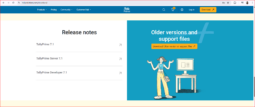
From there you can see an option like :
Older versions and
support files
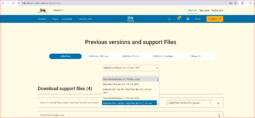
in the above Dropdown you can search and download any older version of Tally including Tally 9, Tally ERP 9, Even Tally 7.2 but you should know that older versions are not advisable to use as they do not get official support in case of need.
Alternatively you can go directly to the older version of Tally
This is the part many users miss.
Step 3: Open the Support Files Page
Once you reach the Support Files area, you can find previous releases and additional utilities.
Tally currently describes this section as the place to download the latest and previous versions of TallyPrime along with other product and support files.
You can also download Some support files as shown in the screen shot like :
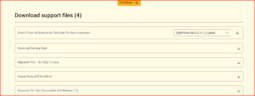
Smart Financial Statements Template For Non-corporates
— Download Sample Data
— Migration Tool – for Tally 7.2 data
–Import Party GSTIN Add-on
— Extension For Tax (Compatible with Release 7.1)
Step 4: Find the Version You Need
Depending on what you are looking for, the support area includes resources for:
- current and previous TallyPrime releases,
- TallyPrime Server,
- TallyPrime Developer,
- Tally.ERP 9,
- migration tools,
- conversion utilities,
- legacy support files.
For example, Tally’s support page still lists Tally.ERP 9 Release 6.6.3 dated July 13, 2020, along with older resources.
It also contains legacy conversion resources going as far back as Tally 4.5, including a Tally 4.5 to Tally.ERP 9 Data Conversion Guide and Data Conversion Utility.
Important distinction
Not every historical item shown in Tally’s support area is necessarily the complete installer for that particular old product.
For very old generations such as Tally 4.5, some entries are specifically migration/conversion utilities and documentation rather than simply an old Windows installer.
So select the file according to what you actually need:
running an old release and recovering data created by an old release are two different problems.
Why Would Anyone Need an Old Version of Tally?
There are several perfectly legitimate reasons.
You may have received an old Tally backup from a client.
You may have discovered accounting data stored on an old computer.
Your accountant may need to inspect historical books.
A company may have stopped operating ten years ago but now needs old financial information.
You may need an intermediate Tally version to migrate old data.
Or you may have an old customisation that only works with a particular release.
This is why Tally’s continued availability of older releases and migration resources matters.
Accounting data can remain important decades after the software that originally created it has disappeared.
Have Old Tally 5.4, 6.3 or 7.2 Data? Don’t Delete It
One of the most useful things Tally continues supporting is migration from very old company data.
Suppose you find an old backup from:
- Tally 5.4,
- Tally 6.3,
- or Tally 7.2.
You cannot migrate these versions directly into the latest TallyPrime.
Instead, Tally documents a two-step migration process.
Step 1: Old Tally → Tally.ERP 9
First migrate the Tally 5.4, 6.3 or 7.2 company data to Tally.ERP 9.
Tally uses a migration utility called:
tally72migration.exe
Tally’s documentation says this tool is available with Tally.ERP 9 and is used to migrate these older data formats.
Step 2: Tally.ERP 9 → TallyPrime
After successfully migrating the old data into Tally.ERP 9 format, you can migrate the Tally.ERP 9 company to the latest TallyPrime release.
So the migration path is effectively:
Tally 5.4 / 6.3 / 7.2
↓
Tally.ERP 9
↓
Latest TallyPrime
That makes the availability of Tally.ERP 9 and its migration tools important even though TallyPrime has replaced it for current usage.
Back Up Your Tally Data Before Migrating
Do not experiment directly on your only copy of historical accounting data.
Before migration:
- Make a complete backup.
- Keep the original backup unchanged.
- Work on a duplicate copy.
- Confirm the number of companies.
- After migration, compare masters and voucher counts.
- Check Trial Balance, Balance Sheet, outstanding balances and stock.
- Only then treat the migrated data as successful.
Tally itself recommends taking a backup before migration. Its newer migration workflow also provides a Migration Summary showing voucher and master counts and highlighting exceptions.
For important business data, verification is not optional.
What Happened to Tally.ERP 9?
Tally.ERP 9 was launched in 2009 as a comprehensive business management solution. Tally’s own company history identifies 2009 as the Tally.ERP 9 launch milestone.
For a generation of accountants and business owners in India, “Tally” and “Tally.ERP 9” almost became interchangeable terms.
But Tally did not stop there.
TallyPrime eventually became the next generation of the product.
So if you are starting a fresh implementation today, the normal choice should be TallyPrime, not Tally.ERP 9.
The reason to download Tally.ERP 9 today is generally because you have a specific compatibility, historical-data or migration requirement.
A Short History of Tally
Tally has been around far longer than most business software products still actively used today.
Tally Solutions traces its history back to 1986. Its own company timeline includes milestones such as Tally 6.3, Tally 7.2, Tally.ERP 9 and eventually TallyPrime.
Long-time users will recognise many generations of the software:
Tally 4.x → Tally 5.x → Tally 6.x → Tally 7.2 → Tally 9 → Tally.ERP 9 → TallyPrime
The names changed.
The user interface changed.
Taxation changed.
Operating systems changed.
The way businesses connect to banks and government portals changed.
But the fundamental purpose remained remarkably consistent:
record business transactions correctly and turn them into useful accounting information.
That continuity is one of the reasons Tally remains relevant decades after its first release.
Is Tally Still Relevant in 2026?
Yes.
And not merely because businesses are resistant to change.
Tally says its software is used by nearly 2.5 million businesses, with millions of users across more than 100 countries.
There are several reasons for that longevity.
1. Accounting Is at the Centre of Tally
Many modern small-business applications begin with billing.
Create an invoice.
Collect payment.
Show a simple sales report.
That is enough for many businesses — until accounting becomes more complicated.
Tally starts from accounting.
That becomes important when you need to handle things such as:
- journal entries,
- contra entries,
- debit notes,
- credit notes,
- bill-wise receivables,
- bill-wise payables,
- cost centres,
- inventory valuation,
- stock journals,
- manufacturing,
- multiple companies,
- bank reconciliation,
- statutory compliance,
- Profit & Loss,
- Balance Sheet,
- Trial Balance,
- audit requirements.
For a very small business, the distinction between a billing application and an accounting system can appear insignificant.
As the business grows, it becomes considerably more important.
2. Tally Has Continued Adapting to Indian Compliance
GST did not exist when I first published this article in 2010.
Neither did today’s e-Invoicing ecosystem.
Tally adapted.
Today’s TallyPrime supports modern GST and related compliance workflows and continues receiving changes as the regulatory environment evolves.
TallyPrime 7.1 itself includes improvements to IMS reconciliation, e-TDS/e-TCS and GST-related functionality.
For accounting software, continuous compliance maintenance matters enormously.
3. There Is a Massive Tally Knowledge Ecosystem
Tally’s biggest advantage is not merely software.
It is the accumulated knowledge around the software.
Across India you will find:
- accountants,
- bookkeepers,
- Chartered Accountants,
- tax consultants,
- Tally partners,
- implementation consultants,
- TDL developers,
- employees,
- business owners
who already understand the language of Tally.
Terms such as:
Ledger, Group, Voucher, Godown, Stock Item, Cost Centre, Bill-wise Details
are familiar to millions of users.
That human ecosystem is difficult to recreate.
4. Old Accounting Data Still Matters
This article itself demonstrates another strength.
A business can discover Tally data created many years ago and still have an official migration path toward modern TallyPrime.
Tally’s documentation specifically maintains procedures for migrating old 5.4, 6.3 and 7.2 data through Tally.ERP 9 into the latest TallyPrime.
That kind of backward continuity matters in accounting.
Your FY 2010-11 books do not stop being important because your software received a redesign.
5. Tally Is Still Evolving
It would also be wrong to describe Tally as software that stopped evolving with Tally.ERP 9.
Recent TallyPrime releases include functionality around:
- Connected Banking,
- SmartFind,
- automatic backup,
- GST reconciliation,
- invoice customisation,
- improved financial reporting,
- digital document workflows,
- and data exchange.
Release 7.1 adds further functionality around invoice templates, IMS, Schedule III statements, banking and compliance.
So Tally’s development clearly continues.
But Modern Businesses Often Need More Than Accounting
This is where the discussion becomes more nuanced.
Being excellent accounting software does not automatically mean a product should become the operating interface for every employee in a business.
A modern business may want its salesperson to:
- create an order from a phone,
- check inventory while visiting a customer,
- create an invoice remotely,
- collect payments,
- view customer outstanding balances.
A warehouse employee may need a completely different workflow.
A manager may want dashboards from a browser.
Customers may want to:
- log in,
- view invoices,
- download statements,
- place orders,
- and pay online.
An e-commerce company may need Shopify orders to enter its accounting workflow automatically.
A SaaS platform may want to exchange data with Tally through APIs.
Trying to solve every operational problem by replacing the accounting software can be unnecessary.
Sometimes the better solution is:
Keep Tally where Tally is strong and extend it where your business needs something different.
You Don’t Necessarily Have to Replace Tally to Modernise Your Business
Consider a company that has used Tally for ten years.
It may already have:
- years of accounting history,
- thousands of ledgers,
- product masters,
- GST configuration,
- multiple companies,
- accountants trained on Tally,
- a CA who expects Tally data,
- TDL customisations,
- established year-end processes.
Now imagine that this company wants its salespeople to work from mobile phones.
Replacing its entire accounting system simply to solve that problem may create a much larger migration project than necessary.
The same applies if the business wants:
- browser access,
- field sales,
- customer ordering,
- mobile invoicing,
- approval workflows,
- online payment collection,
- or integration with another SaaS platform.
This is the architecture we have increasingly worked towards with Bizmitra:
Tally remains the accounting backbone while Bizmitra provides modern cloud, mobile and operational workflows around it.
Extend Tally with Bizmitra
Bizmitra is useful for businesses that want to continue using Tally but need capabilities beyond the traditional desktop accounting workflow.
Depending on the business and implementation, Bizmitra can extend Tally into workflows such as:
- Tally access through mobile and browser-based business processes,
- sales orders and invoicing,
- field sales and van sales,
- quotations and order management,
- inventory visibility,
- e-Invoicing workflows,
- multi-user operational access,
- customer portals,
- online ordering,
- management dashboards,
- and integration between Tally and external applications.
The objective is not to recreate Tally in a browser.
It is to allow different people in the organisation to perform the work relevant to them while accounting ultimately remains connected with Tally.
For example:
Salesperson → Bizmitra → Tally
rather than requiring every salesperson to operate the accounting system directly.
Or:
Customer order → Bizmitra → Tally
Or:
External application → Bizmitra Connector/API → Tally
This means a business does not automatically have to choose between:
“Keep Tally”
and
“Move to the cloud.”
There is a third option:
Keep Tally and extend it.
Want to use Tally beyond the desktop?
See How Bizmitra Extends Tally to Mobile, Browser and Connected Business Workflows
Should You Use TallyPrime?
If you are evaluating accounting software for a business today, TallyPrime deserves serious consideration when:
- accounting depth matters,
- your accountant or CA already works with Tally,
- you maintain inventory,
- GST compliance matters,
- your business needs proper financial statements,
- you expect accounting complexity to increase,
- historical data continuity matters,
- or you value Tally’s large user and professional ecosystem.
On the other hand, if your requirement is simply:
“I need to make ten invoices per month from my phone.”
then a lightweight billing application may be easier.
There is no universally best accounting application.
The correct question is:
What will my business require two or three years from now — not merely what do I need to create today’s invoice?
How to Start Learning TallyPrime
If you downloaded TallyPrime because you want to learn it, don’t try to learn every feature at once.
Start with the accounting foundation.
Recommended learning sequence
1. Create a Company
Learn how the company, financial year and books-beginning dates work.
Tally’s current company creation workflow also supports multiple companies, role-based security, base currencies and other configuration options.
2. Understand Groups and Ledgers
This is more important than memorising keyboard shortcuts.
Understand why:
- Cash belongs somewhere,
- Bank belongs somewhere,
- Customers belong somewhere,
- Suppliers belong somewhere,
- Expenses belong somewhere,
- Income belongs somewhere.
Once the accounting structure makes sense, Tally becomes much easier.
3. Learn the Main Voucher Types
Practise:
- Contra,
- Payment,
- Receipt,
- Journal,
- Purchase,
- Sales,
- Debit Note,
- Credit Note.
4. Understand the Trial Balance
If you understand what the Trial Balance is telling you, you are learning accounting rather than merely learning data entry.
5. Study Profit & Loss and Balance Sheet
Follow transactions from voucher entry to financial statement.
6. Add Inventory
Then learn:
- Stock Groups,
- Stock Items,
- Units,
- Godowns,
- Stock Journals,
- valuation.
7. Move to GST and Advanced Features
Only after understanding the accounting fundamentals should you make GST, reconciliation, banking and other advanced functionality your priority.
Frequently Asked Questions
What is the latest version of TallyPrime?
As of August 15, 2026, the latest official version is TallyPrime Release 7.1, released on May 20, 2026.
Can I download TallyPrime for free?
You can download TallyPrime from Tally Solutions. Tally currently offers a 7-day free trial, and the software can also operate in Educational Mode for learning purposes.
Is TallyPrime Educational Mode completely free?
Educational Mode can be used without a normal commercial licence for learning and practice, but transaction dates are restricted. Current Tally documentation states that transactions in Educational Mode can be recorded only on the first and last day of a month.
Can I still download Tally.ERP 9?
Tally continues maintaining Tally.ERP 9 releases and related files in its official Support Files area.
For a new business installation, however, you should normally use the current TallyPrime unless you specifically require Tally.ERP 9 for compatibility or data migration.
Where can I find previous versions of TallyPrime?
Tally maintains a separate official Support Files page containing previous TallyPrime versions and related downloads.
Can I open Tally 7.2 data directly in TallyPrime?
Not directly.
Tally documents a two-step migration process:
Tally 7.2 → Tally.ERP 9 → TallyPrime.
The same process applies to Tally 5.4 and Tally 6.3 data.
Can old Tally 4.5 data still be converted?
Tally’s official Support Files area still lists a Tally 4.5 to Tally.ERP 9 Data Conversion Guide and Data Conversion Utility.
For extremely old or important company data, always preserve the original files before attempting conversion.
Should I use Tally.ERP 9 or TallyPrime?
For a fresh implementation, use the latest TallyPrime unless you have a specific technical reason to use Tally.ERP 9.
Tally.ERP 9 remains particularly relevant for businesses dealing with historical installations, old customisations or legacy data migration.
Can I use Tally on mobile?
TallyPrime remains primarily a Windows application; Tally’s recommended configuration specifies 64-bit Microsoft Windows environments.
Businesses needing broader mobile, browser, field-sales or customer-facing workflows can use additional solutions around their Tally accounting environment.
Bizmitra is one such approach for organisations that want to extend Tally rather than replace it.
Final Thoughts
When I first published this article on January 22, 2010, the page had a very simple purpose:
Download Tally.ERP 9.
More than sixteen years later, I considered simply deleting it and writing a new TallyPrime download article.
That would have missed something important.
Businesses don’t always live on the latest software version.
Old accounting records survive.
Old companies survive.
Old backups turn up on hard drives.
Accountants inherit data from previous accountants.
Businesses upgrade gradually.
And sometimes you need yesterday’s software before you can move yesterday’s data into today’s software.
So this page will continue serving both purposes.
If you are starting today:
Download the latest TallyPrime from Tally Solutions.
If you need an older version:
Use Tally’s official Support Files section and select the previous release or migration resource you need.
If you have very old Tally data:
Back it up first, identify the version and follow Tally’s documented migration route.
And if you like Tally’s accounting but your business has outgrown the traditional desktop workflow:
Don’t assume replacing Tally is your only option.
You can keep Tally as your accounting backbone and extend it with modern mobile, browser, customer, sales and integration workflows through solutions such as Bizmitra.
Disclaimer: Tally, TallyPrime and Tally.ERP 9 are trademarks/products of Tally Solutions Pvt. Ltd. TallyNine is an independent knowledge resource and is not the official Tally Solutions website. Product versions, download options and features may change; always verify the latest information on the official Tally website before installing software.
I need Complete tally help manual and reference file
Please send me your mail address
Hi, Can I also have study manual and material to learn Tally 9 please? I will be very much thankful to you if you can provide me this. Thanks again.
Ricky,
there is no studay material/manual.you Can learn it here by reading different post and if you face any problem, you may raise the same. I will solve it
iwant to know how to learn tally easily please help me
I require a Tally erp 9.0 complete manual. If you can send me the link to download OR send the manual soft copy to my e-mail (nmkrao@gmail.com)
Thanks for your help in advance.
Urs,
Rao
I need Complete tally help manual and reference file
Please Send me tallyworld ERP 9 full user menual or Study Guide.
Thanks in advance
hi sir this is prabhakar reddy from hyderabad,
sir i have one question to ask to you
one branch issue one check for employee salary what is the branch should pass the entry and also another branch pass the entry what is entry pass sub branch
pls send the entry as soon as possible
i need complete tally to learn
hi,
sangitha
send your email id to my email i will send the tally learner guide
I would be really appreicate if u send me the learner Guides or notes for TALLY users, It will be benefits for me and other also. Take care and awaiting ur reply v mail
Dear Mohammed and all,
I have been creating a Tally beginner’s guide which will surely help you all to get started learning tally.So, wait till that time meanwhile the video tutorials CDs are available at very affordable prices and the same is very useful for learning Tally.
you can get it at http://www.lsoit.com/samples.asp?custid=19
I need tally erp 9 v 1.5 or upper crack version. if you have please give exe files
Dear Rajesh,
This is not a right place for you.
I do not provide crack version.
Please do not post this type ‘crack’ requirement in future on this blog
Hi.. i want to learn tally from basics.. will u help me plzz… thanks
Dear Mahendraji
soon after i go to open a company particular month ,, i get the below error ,, its not going ,, i tried re-write as well
Exiting Tally!
Internal Error. Contact Tally Solutions
Software Exp. c0000005
(Memory Access Violation)’
This happens only for one particulat month. rest all month works. I am using tally 7,2
This is possible in tally because u may have made a wrong entry in that particular month or day. I had faced same kind of trouble a two year ago.
if possible, then please upload your data in zipped file at contact us page. i will try to recover it. and if it is not possible for you, to upload data due to confidential issue (I understand it no problem)then try to find out that particular entry by Day book or any way you may find. You will be able to find out that particular entry. Then delete that entry. and your tally will work find without any problem.
Dear Mahendraji
Thank You for your reply. I have the backup copy of the same data. I take backup whenever i complete making entries. The backup copy is working ..
The same problem had happened last month and i used the back up copy and the same was working absolutely fine.
But i want to know why this kind of problem has reoccur as its a serious issue.
For data i wont be able to send as its confidential. Sorry for that. To find that entry is not possible frm the original file that hasgot corrupt since i simply cant get into any january 2010 transactions in the original.
It seems the problem is something else then wrong entry .
Here what i meant by wrong entry is let me explain you in detail
suppose you working in tally and while accepting a particular voucher or during mid of your work on tally suppose you got power disturbance or due to any reason you forced to quit from tally software, then there will be system created an entry which is creating problem.
I have sufferred same kind of problem that I was not able to view or open data relating to a particular month. then I used to find out that entry by going to day book. i find out that entry and deleted and re enter all the vouchers of that month. then I never face that problem
Here is an another solution for you if above do not work.
go to Display
statement of accounts
Statstics
you will find all the vouchers there like purchase sales etc.
now go to purchase
you will find month wise entry of vouchers there try to go to particular month voucher for which u r facing problem
if you are able to do that then just try to re accept every voucher of that month
if this does not work, then you will have to take help of tally software persons within your city but even he can’t do anything without accessing your data
Dear Mahendraji
Thanks for the vital insight however i am still curious that why is the backup copy is working without any error ?
I had earlier try to access the journals from the display , but for january 2010 , the same error prevails
For january 2010 no data is accessable from any means of views.
I need tally assignments for self study.
if want help tally call
I have just started learning tally.9 thru a coaching class, 2 hrs every day for 15 days. Will i be able to understand and learn it properly within this duration ?
Tally is not a thing that one can learn it within couple of days by joining some classes. Its a self explanatory and self learning software. All it need your time and lot of trouble to understand it.Just today one of my reader had created a company successfully by reading my article how to create a company. This reader used tally software today for the first time in his life and he never go to any tally classes.
If you don’t want to spent more time after it, then I am sorry to say that no tuition class in this world can help you.
Dear Mahendra Ji,
How can i upload my excel data into tally 9. I have tried converting it to xml file but could not succeed. Please guide ?
DEar Fazly,
Thanks for your comments.
You will not be able to do so. It requires xml format as per tally defined TDL codes.Contact some tally TDL professional for this job.Alternatively, you may learn tally developer language and then can develop such xml format to import into tally from xls
hi
i am required to maintain accounts in both tally and quickbooks as ours is a US based firm
i am maintaining all accounts books since inception of the company in 2007. is there a way by which i can export all information from tally erp 9.0 – transactions, lists etc to quickbooks?
Sayee,
Sorry, I have no idea about quick book. but in tally, you can export all your accounts to xml,html. you have to check with your quick book support team how to import such xml requests from tally.
or tally developer person can help you to set up the same.
I want to learn complete tally. like how to make entries in tally and other things.
Please help me .
My email – navratan_jaipur@yahoo.co.in
Please send me any tutorial guide that teaches me about usage of tally .
thanks
Navratan
Hi,
I learn tally 5.4 before 8 years. so I want latter version. i want tally full 9 version so help me. I want to learn update new version
I want to learn complete Tally. like how to make entries in tally and other things. please help me. and also i need the free download the tally software. please help me.
thanks
hi….respected mahendra garu,
first of all i hv to appreciate ur work here. ur excellent.
first of all
my self new to tally. i want to learn tally from starting. how to start cash book in tally. plz help me.
i created company in tally. but after then i m unable to start like how to create heads, how to write cash book, how to make opening balance, how to make entries in cash book..etc.
Plz help me sir.
waiting for ur reply.
Hello,
Can anyone provide me with information on how to learn tally online. Where can I get the material to learn.
Thank you.
Brendan,
I don’t think if there any proper material available for online learning. you can browse tallynine.com and other some other sites for free learning of tally.
I want to learn complete Tally. like how to make entries in tally and other things. please help me.
Dear Anjali,
I have no idea how to help you. you may read the articles on the site and in case of any problem, you may contact me at Gtalk. Except this I am not sure how to help you.
Dear Mahendra,
I want purchase tally erp 9 product for income purpose. I am starting new job of tally entry and finalizaition on contract basis with firms. But I am so much confused about the correct price of tally erp 9 licensed package b’coz on internet is it showing Rs. 13,500/- for single user and some of my friends tell me that is is availble at Rs. 3,500/- for single user also.
Can you please help me so I can purchase the tally package and tell me the to whome I purchase the software.
Thanks.
Dear Paresh,
To get the correct information about a product, one should access the authenticated sites of that product company. http://www.tallysolutions.com is the authenticated (Tally Solutions Pvt. Ltd’s) site and to get the required information you should refer to this site. You will get the price list. Please visit this site. then go to products then click on ERP. On right side bar navigation you will find a price list menu. click it and you will the correct price list for the same.
Price for Single user is Rs. 13500.00 only. It is final inclusive of vat and it does not take any other cost. Some dealer may charge you installation charges. It depends up to you.
If it is available at a price of rs. 3500 then it will not be a genuine copy of the software … means you can not get the benefits of using an authenticated software.
You should buy the tally.erp 9 from an authorised dealer/Tally Service partner only. You can get the list of authorised dealer from the site http://www.tallynine.com
We are also authorised Tally Service partner and if you wish so, we can help you in purchasing and installing the same. We do not charge any thing extra and help all our customers and users in set up of entire tally.erp 9 system and problems relating to accounts, tally etc.
So, if you are interested, then please let me know
Hi,
I want to create a company with following name
e Care Centre
the first letter of a my company name starts with small letter how shall i create this company, please help, my e-mail id is
shahdk@yahoo.com
Thanks,
Sailesh
Dear Mr. Dilip,
By Default, it will capture first capital letter.you may raise your query in favor of I Vision Info Tech from your tally software or write directly to Tally Solutions so that they can modify it in its next release.
how to setup the different printer for report printing – when i am choose to print its took me to default printer (pdf) not showing optional other printers – pls help to solve this problem – thanks a lot
how to import data from excel to tally?
Arvind,
It is a long process and can’t explain here through comment. Will write an article about the same in detail.
HOW TO IMPORT EXCEL STOCK & PRICES TO TALLY ERP9
Dear Mr. Mahendrea,
We have been using tally ERP 9, need to know how do we deal in multiple VAT entry this ie 12.5% and 5%, Do we need to prepare invoice differently. While preparing Tax Invoices it ask for VAT / TAX Class and if we select 12.5% then we are not able to create invoice of product billed at 4 %, please help
Dear Raj,
I would appreciate if you can post your query on forum.tallynine.com because I have already answered this question some where else in comment section. I have to repeat same answer each time. So, please post it appropriate place.
In short, you don’t need to create a different invoice. you can enter multi vat, in single invoice
Why are you not answering my queries…. Or Am I not posting it correctly??
Murli,
Everytime you post 3-5 repeated comments. I hate spamming on this site.
Also, I requested so many times to all readers to post their query only on support forum
Further to above, I do not approve comments of below type :
01. Please send me tally notes
02. please send tally materials on my mail ID
03. please help me
I have been fed up of these type of request and I press only DELETE button.
If you have any query, please post it on the forum with full details as much as you can provide.
I repeat if you have a query in accounts and tally, Then I have a solutions
Hi !
I am using tally 9 erp . somtimes I need send report to others, I want the report in PDF format is it possible take data from tally to PDF format without using scanner ?
Thank you
Dk Jangir
Jangir,
Yes it is possible to prepare reports in pdf/jpeg direct from tally. but it works with release 1.8 and higher only.
please visit http://176.58.120.139/wordpress/secure-your-new-release-1-8-renew-your-tally-net-license-just-now.html for more details
you can export your reports from tally direct in pdf/jpeg/tif format no need to scan
I want to learn tally 9&accountacy
Ashok,
I am very much happy to see that you want to learn Tally 9 and accountancy
i want to learn how to send mail from tally erp (mail Setting)?
Prashant,
I have wrote a detailed article with screen shot. please check the category of email or try to search out from the site.
Dear Mahendraji,
It is very pleasure that some like you helping pepole who wish to learn tally. It is great platform to ask tally related problems for sure & reliable answer.
I also have one question. I have two seperate Companies, one is for the period FY 09-10 offline & other is for Period FY 10-11 which is online. due to entered some adjustment & provisional enrtries after splitting the original company, my opening balances did not matching (Bill wise). Would you give me working solution on the same?
Dear Mahendra Ji,
My accounts have been done in Tally ERP 9 Release 1.61. I want to migrate it to or use in Tally 7.2. Can I do it? If yes, how?
Dear A.k. Singh,
Up gradation is always welcome and I do never recommend degradation. Why you want to move to tally 7.2, ?If you are facing any problem, in tally.erp 9, then I would be very much happy to solve the same.
Hi,
Since 3-4years we are taking the hard copy of vouchers in some general format. But now are planning to take the Voucher printouts from Tally itself (since we are anyway entering the transaction in Tally). Our Tally version is ERP9. So please provide me the details regarding this: How to set or configure the alignments, Can we adjust the length & width of the Voucher etc. Can we adjust the 2 Vouchers in a Single A4 size sheet, for this what is the configuration? Please furnish the above details.
Sowmya,
It is always good idea to print voucher from tally rather then preparing hard copy and I am using this facility since last 4 year. We have daily 30-50 vouchers so it help me to finish all my work within short time.
you can set up configuration by
Main menu
F12
Printing
Payment vouchers
just set here your own setting
for printing 2 voucher in A4 size one page, I am not aware if you can do it.
Thanks for your reply Mr.Mahendra. But I can’t able to set other setting other than Height 7inch & width 5 inch. I need to increase width & decrease the height. If we change the height & width, then it throws an error “error in TDL properties” & close the whole tally application. What to do?
Can we Change the font size & style of the vouchers for printing purpose
No Sowmya,
You can’t change it. you need to learn TDL or to hire some professional to do so.
Hi i need ur help i knw the tally but i forget every thing coz nt used it since last 3 years so can u tell me how can i start i knw hw 2 create co. & all this i m facing a prblm whn i start grouping so if u dnt mind can u help me out…..plzzzzz
Tushar,
I have written articles on a detailed guide with screen shot on how to create company, ledgers, grouping and so many subject.
Have you take trouble to read it/to find it ?
I help only people who help thyself. for this purpose you need to spent time to read as much as possible.
Dear Sir
Just i want to know how can i learn TDL programming Tally organize any Classes or any other resource. Is TDL e-book is available in NET
Please advise me.
Hemant,
Tally Solutions Pvt. Ltd organize tally tdl class occasionally. Details of the same are being published on the site frequently. Fees is Rs. 6750.0 and training duration is 5 Days
There is no E book available for TDL.
i want to purchase tally 9.0 for accounting purpose. kindly help in purchasing tally 9.0. which tally 9.0 will b better for me.
how to download tally9 software
Dear Mr. Mahendra,
I have three bank cheque book and as per your privous sugesstion on cheque printing i confirgure the satting for my ICICI Bank Account but when i go to make another setting for HDFC bank my ICICI bank setting change automatically.
Your valudable suggestion requaired.
Please send me suggestion on my mail id if possibale.
Regards,
Krishan Kant
Krishnan,
Its a very easy issue. Once you have created cheque printing configuration for icici bank then save it. after that, it will show you the name of the icici bank in the cheque printing setup. Here you don’t select icici bank but move down your cursor one step below in a blank field. Now in that blank filed type hdfc bank. and press enter. it will return the blank field for set up. put here the related dimension for HDFC. In case you still suffer, problem, just contact me on Gtalk and I will resolve it.
Dear Sir,
Do You have any option to generate COSTCENTRE WISE REPORT with Narration??
I tried to generate but i could not be able to..Is there any option?
hi
i have installed tally.erp 9 educational version and also dowloaded help file in tally folder but i am not able to open it. it pops up an error message navigation to web page was canceled can u please let me know how to use help file.
good software tally erp thank u
hai i have problem with payment voucher print settings..
I changed the height of voucher and width of voucher in payment voucher configuration settings but after restarting the tally it goes to default one.. .. how do i change it……….
Thank you
Rajesh,
which tally version, you are using? And from which you have changed the voucher print settings.
I have this question which i asked at yahoo also,
if someone can help … it wil be great
http://answers.yahoo.com/question/index;_ylt=AraE8QE68y42DIuV8Ds4Chfty6IX;_ylv=3?qid=20101109215240AAnXViE
Tally entry for Sales Invoicing in warehouse?
We have three warehouses
we are issuing invoices … cash, internal, mechanical etc.
I have already entered stock items in tally
Inventory info===>Stock Groups====>three warehouses
Inventory info===>Stock items=====>all items
Now I want to make sales invoice … if someone can guide me in simple steps … its internal invoic where I want to put vehicle plate number and job number also IF ITS POSSIBLE so that it can be sorted out by vehicle plate number but mainly how could I make simple invoice … i have created company and now created stock groups + entered the items details, now what next.
It looks like I have to go inside accounting vouchers to make invoice.
I will be really thankful for any help.
Thanks
Waleed,
For different warehouse, you can create different Godowns.
Now, when you have to transfer materials/items from one godown then go to inventory voucher (not the accounting voucher) then you will find left and right side two option. one is for consumption and another is for production
use the one which is related. and thereby you can make inter godown transfer entry easily.
If you face any difficulty, then do revert back with your tally serial number and I will sort out it.
Firstly, If possible, I want to take training of tally from you lesson by lesson.
secondly, I want to download tutorial of Tally in pdf format.
what can I do Mahendra guruji ? Please help me. I’m from Nepal. Please mail me.
with best regard
Ananta Sapkota
Kathmandu
Ananta,
Tally tutorial (Reference material) is available free of cost from tally solutions’ site. you can download it.
Dear Mahendra sir,
This is mahendra too, Can you pls help me to configure leaf cheque print from tally erp9 for HDFC Bank. Can you pls let me know which printer support leaf cheque printing.
my email id is mbisht_81@yahoo.co.in.
Thanks & regards,
mahendra Bisht
dear sir how make download full free tally erp9 without any broblem plz. advise me given address thanks
Imran,
Why you want a software for free ?
Tech people are not Free to provide you something Free!
Will you like to work for free for some one?
Please develop your capacity to buy something otherwise learn how to solve your problem to use FREE stuff
i want to learn every thing step by step at the starting in tally 9 so please help me.
Hi Sir..
i want to learn tally from basics.. on trading account
will u help me please…
thanks
sir how to make an entry for ” drawings” , under which group it must be taken
I want a tally erp 9 1.61 urgent
Hi, Can I also have study manual and material to learn Tally 9 please? I will be very much thankful to you if you can provide me this. Thanks again.
HI Mahendra
I started using tally in 2010 and opened a company for that year and entered the balance(maintaining base currency as SGD)..For USD that needs to be converted to SGD opening balance,I used a certain rate..When my auditor gave me the opening balance,I needed to change 3 of the ledger’s opening balance..I managed to change it but the problem is when I see Trial Balance,it shows as the old rate.
For example
UOB USD
US$ 27,500 @ S$1.4039/USD= SGD 38,607.25 (My opening balance)
US$ 27,500 @ S$1.40/USD = SGD 38,500.00 (Auditor’s opening balance)
AFter updating the opening balance,instead of showing SGD 38,500.00, it is showing as SGD 38,607.25 in trail balance.
Is there anything that can be done to rectify it?
can anybody send me full definitions of all accounting of tally on my email id
how to send ledger reports by mail to clints
Going through ‘step by step company creation in tally’ asked me to download education version of tally. But am unable to download the same.
I want to learn to work on tally. Kindly help me in this matter.
Please help in getting the dimensions for cheque printing in tally erp 9 for the banks HDFC , Bank of Baroda, Indian Overseas Bank
Thanks
Jigar,
I am always ready to help people but I expect that people also take some efforts esp when they are seeking a “Free Help”
Please take a scale and measure your actual cheques and put the dimensions in Tally at appropriate places.
If you still can not do that then I would suggest you to hire some one who will help for a fees
mahendra,
i just want help frm you about please give me detail how i can feedup servicetax transaction in tally 9 erp.our firm provide comeercial coaching services..this is our 1st year to face service tax due to new budget…
or informe me any other book wich give me compleate info on that..
Vishal,
Service Tax is a legal issue and don’t think that by reading some book, or something you can handle it except if you are a very sharp intelligent and knowledgeable person in Accounts and a software
Still there is free PDF guide is available for all the Tally user on the Tally solutions site which is enough for some one to handle Service tax. Take it and go ahead.
Dear Sir,
My Tally erp SN is 7xxxxxxxxx series A release 2 Gold,I want to learn how to make tdl & in stock summary why there has not been the column of purchase,sales return,production,sales,stock transfer to branch.It has only shown inward & outward column.I am always facing problem becoz purchase,sales return,production shows jointly in inward whereas sales,stock transfer in outward jointly.Can’t this be segregated.
I would be eagerly waiting for your reply.
Hello Manohar,
Thanks for contacting us.
In Tally, Inward includes all the items “coming into” whether it is produced, Sales return, purchased or whatever it may be.
If you want to see all the inward/outward bifurcation than it is possible through a TDL only. A default software is meant for the general purpose,general use by majority of users without a specific customisation. However many organisation needs special reporting, which is possible through a TDL only
hello friends.
thank for contactng
the tally in coming into produced to devolpment of company. purchased of whatever ii may be.
if you never mind. inward which possible through a tdl only..
hi
i m using tally7.2 version,now i want to learn 9.erp ,from where i get to study or is ther any institute which hv such courses and provide tally certificate after completing it.
give me a complete refrance book about tally
HI MAHENDRA ..I AM LEARNING TALLY ERP9 ..IN CASH BALANCE BOTH CASH AND CHEQUE AMOUNT IS ADDING ..CAN U HELP ME HOW TO REMOVE THE CHEQUE AMOUNT FROM CASH BALANCE…..IN BANK BALANCE CHEQUE AMOUNT IS COMING CORRECTLY ..AND IN CASH BALANCE CASH AND CHEQUEAMOUNT IS COMING COMBINDLY..HELP ME PLZ
i am a student but now i am free after completeing my Bichler in computer scince but now i neet to much to learn tally.becous when i going for the job/ apply for the job they first asked from me about tally please help me in this case.
i will be very thank full to you
now i am dowloding tally erp.9 please send me tranning vidios for learning tally.
with best regard
mahboob
I need the material to learn tally?
Thank you in advance.
i need all material with example to learn tally erp 9
hi there does any1 have the tally manual in pdf format if yes can u pl mail me
i want tally erp 9 free manual pdf to learn accounts
i want tally erp 9 manual to learn accounts… if anyone have it plz mailme
pls tell me where and how the sale invoice \tax invoice r entered in tally
i want to learn tally 9.0 plz send learn book my email id
Sir I am a hostel Accounts of the problem come next year when the new Student Book Day in their name and delete all entriesI wanted to do this again in the Alt + D i wanted to have a short key at a time you can delete all entry
You’ll wait for the response to
Thanks
Dear Mahendra,
I have created a new company in Tally ERP 9 with Inventory. I have been using tally for last 4 years. But I have no idea how should I maintain inventory. I have created stick items. When I make purchase entry item purchased doesn’t appear in the stock register. It is only after Receipt Note entry items appears. I am not sure if this is right procedure to do so. Please advise what is the best practice. I have one more query that is I buy items at different rates. For example I have different variety of Product A bought at different rates; should add them as different items? I want to take them under one item still with different rates since I may not buy same item again. Please advise. Thank you in advance for advise.
Pathan it looks like you r using tracking system where the item purchased is considered only when it has been tracked.
If possible please send me soft copy of Tally 9.0 ERP manual reference.
thank you for your help
i want tally erp 9 manual to learn accounts… pls mail me
plz mail me complete tally manual and reference file….
tally is a good things for children
Hi, thi is nisha n i am working in a company as front desk executive but i dont have the knowledge of tally erp9 because i studied science.so can you plz suggest me how to start learning tally erp9 without attending classes.my email id is mentioned below please help me out.
Hello nisha,
You want to learn Tally.ERP 9? You can surely learn Tally.ERP 9 without worrying your science degree. Tally.ERP 9 is the easiest software. Once I trained my Bsc Friend in Tally.ERP 9. So you too can learn it.
Watch out my tutorial which will be available on Monday 12th April, 2015 in this regard.
I need telly complete erp 9 to need reference file & notes