

Introduction
Business has moved outside the office.
Salesmen are visiting customers. Owners are travelling. Accountants are working from branches. Delivery teams are collecting payments. Managers want reports without waiting for someone to send Excel files. Customers want invoices immediately on WhatsApp. And business owners want to know what is happening in their company without sitting in front of the office computer.
That is why so many users search for Tally on Mobile, Tally Prime Mobile App, Tally ERP 9 Mobile App, or Tally Android App.
The real question is simple:
Can you use your Tally data from mobile without disturbing your existing Tally system?
The answer is yes, but you must understand the difference between different options. There is Tally Remote Access. There is Tally on Browser. There are cloud access options. And then there are mobile-first solutions like Bizmitra that connect with your existing Tally data and allow your business team to work from mobile, browser and field locations.
This article explains everything in a practical way.
You will learn what Tally on Mobile means, whether Tally Prime can run directly on mobile, how browser access works, what real-time sync means, what features a business actually needs, and how Bizmitra helps businesses extend Tally without replacing it.
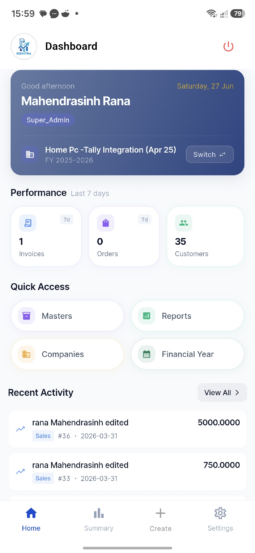
What is Tally on Mobile?
Tally on Mobile means accessing useful Tally-related business data from a mobile phone or tablet.
But this phrase can mean different things to different users.
For some users, Tally on Mobile means viewing reports such as outstanding, sales, purchases, stock and ledger balances from a phone. For others, it means creating invoices from mobile. For field sales teams, it means booking orders, checking stock, collecting payment and sharing invoices on WhatsApp. For owners, it means seeing business reports from anywhere. For accountants, it means keeping the main accounting data safe in Tally while allowing other teams to work outside Tally.
So, Tally on Mobile is not just one feature. It is a business requirement.
A proper Tally mobile solution should help you:
- View important business reports
- Create sales invoices or sales orders
- Access customer and item masters
- Check stock availability
- Record receipts and payments
- Print invoices or bills from mobile
- Share documents on WhatsApp or email
- Sync data with Tally in real time or near real time
- Control user permissions
- Keep accounting data safe
This is where many businesses make a mistake. They search only for “Tally mobile app” and assume that any app showing Tally data is enough. That is weak thinking. A business does not need only a mobile screen. A business needs a reliable operational system that works with Tally.
A mobile app is useful only if it solves real business problems.
Can Tally Prime Run on Mobile?
TallyPrime is primarily a desktop business and accounting software. It is designed to run on a computer environment. You should not think of Tally Prime as a normal Android or iPhone app that you install directly from the Play Store or App Store and use like a mobile billing app.
There are different ways to access Tally-related data remotely:
- Tally Remote Access
This allows authorised users to access Tally Prime remotely, but it requires Tally Prime installation at the remote location and proper Tally.NET/TSS setup. - Tally Reports in Browser
This allows users to view Tally Prime reports in a browser from different devices, including mobile, depending on the configuration and access rights. - Tally Prime Cloud Access
This provides access to Tally Prime through a cloud-hosted environment, where users can work from anywhere using supported access methods. - Third-party or custom Tally mobile solutions
These connect with Tally and provide mobile-friendly features such as invoicing, order booking, stock view, customer management, payment collection and reporting.
So the honest answer is:
Tally Prime itself is not a simple native mobile app. But your Tally data and business workflows can be extended to mobile using the right access method or integration.
This difference is important.
If you only want to view reports, browser access may be enough. If you want full Tally usage from another computer, remote access or cloud access may be suitable. But if your sales, delivery, support or branch teams need to create transactions from mobile and sync with Tally, then you need a proper Tally-integrated mobile solution.
That is the gap Bizmitra is built to solve.
Why Businesses Need Tally on Mobile
Tally is strong for accounting, GST, inventory and business records. Many Indian businesses trust Tally because it is reliable, familiar and deeply adopted by accountants.
But business operations do not happen only at the accountant’s desk.
A salesman may need to create a sales order while sitting with a customer. A delivery person may need to collect payment and update the office. A branch manager may need stock and outstanding reports. The owner may want to know today’s sales while travelling. A service team may need customer information immediately. An accountant may not want every employee to directly operate Tally.
This is why businesses need Tally on Mobile.
Not because Tally is weak. Tally is already doing its job. The real issue is that business has become distributed.
Modern business needs:
- Office accounting in Tally
- Field operations on mobile
- Owner reports on browser
- Team-wise permission control
- Real-time or scheduled sync
- Less duplicate data entry
- Faster billing and collection
- Better visibility across branches
Without mobile access, businesses usually depend on manual workarounds.
Sales teams send orders on WhatsApp. Office staff re-enter those orders in Tally. Delivery teams collect cash but update later. Branches send Excel sheets. Owners ask accountants for reports again and again. Inventory is checked by calling the office. Invoices are delayed because the person with Tally access is not available.
This creates three problems:
- Delay — work waits for the accountant or office computer
- Duplication — the same data is entered again and again
- Errors — manual communication creates mistakes
A good Tally mobile system should reduce all three.
Key Features Required in a Tally Mobile App
A serious business should not select a Tally mobile solution only because it looks attractive. You should check whether it supports real work.
| Feature | Why It Matters |
| Mobile invoicing | Create invoices from Android or iPhone without waiting for office staff |
| Sales order booking | Field teams can take customer orders directly from mobile |
| Customer ledger access | Sales and collection teams can check outstanding before discussion |
| Stock availability | Avoid wrong delivery promises and unnecessary phone calls |
| Receipt entry | Record collections from customers immediately |
| WhatsApp sharing | Send invoices, orders and payment details quickly |
| Thermal printing | Useful for retail, van sales and delivery billing |
| Browser access | Owners and office teams can access data from desktop or mobile browser |
| Role-based permissions | Users should only see what they are allowed to see |
| Real-time Tally sync | Transactions should move between mobile system and Tally without duplicate entry |
| Multi-user access | Sales, branch and admin teams should work together |
| Audit trail | Business owners should know who created or changed data |
| Multi-branch support | Useful for businesses operating from different locations |
| GST/VAT support | Required for India and international business environments |
| Secure login | Prevent unauthorised access to financial and customer data |
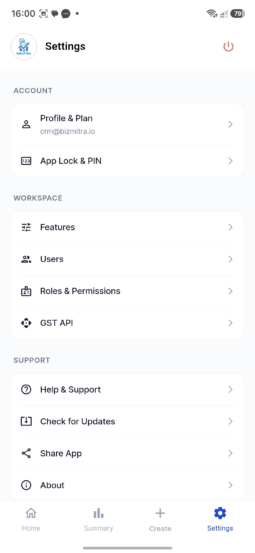
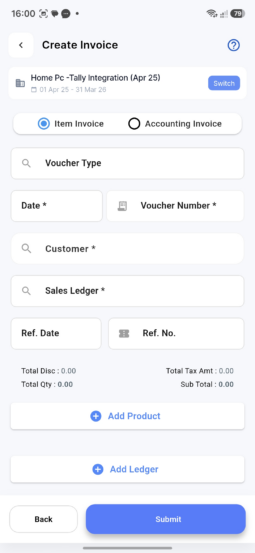
Want to see how this works for your business? Explore Bizmitra’s Tally on Mobile solution
Real-Time Sync with Tally
The most important part of any Tally mobile solution is not the mobile screen.
The most important part is sync.
A mobile app that cannot properly sync with Tally creates more problems than it solves. If the invoice is created on mobile but not reflected in Tally, the accountant cannot trust it. If stock is not updated, the sales team may commit wrong quantities. If customer outstanding is old, the collection team may give wrong information. If sync fails silently, the business owner has no control.
Real-time Tally sync means that data created or updated outside Tally should move to Tally quickly and reliably. It also means Tally data should be available to mobile users based on permissions.
Typical sync requirements include:
- Customer masters from Tally to mobile
- Item masters from Tally to mobile
- Stock data from Tally to mobile
- Ledger balances from Tally to mobile
- Sales orders from mobile to Tally
- Sales invoices from mobile to Tally
- Receipts from mobile to Tally
- Payment updates
- Sync logs and error handling
Bizmitra is designed around this exact requirement.
Instead of asking businesses to abandon Tally, Bizmitra respects the existing Tally system and extends it. Your accountant can continue using Tally. Your business team can use Bizmitra on mobile or browser. The two systems can work together through Tally integration.
That is the correct way to think about Tally on Mobile.
Not “replace Tally”.
Not “force the accountant to learn something new”.
The better approach is:
Keep Tally for accounting. Use Bizmitra for distributed business operations. Sync both.
To explore this solution, visit:
Bizmitra Tally on Mobile
Tally on Browser
Many users also search for Tally on Browser because they want to access reports from mobile, laptop or tablet without installing Tally everywhere.
Browser access is useful, especially for owners and managers who mainly want reports. It reduces dependency on the office computer and allows users to view important information from a browser.
However, browser access and mobile business operations are not the same thing.
Viewing a report is different from creating an invoice.
Checking outstanding is different from collecting payment.
Looking at stock is different from booking a sales order.
That is why you must decide what your business actually needs.
If your requirement is only report viewing, browser-based access may be enough. But if your team needs to create business transactions from mobile, then you need a workflow-based mobile solution.
Bizmitra supports browser access as part of its larger business platform. This means users can work from mobile app as well as browser depending on their role.
For example:
- Owner can view dashboard from browser
- Salesman can use mobile app
- Office team can use web login
- Accountant can continue using Tally
- Admin can manage users and permissions
- Field team can create transactions from mobile
Security: What You Must Check Before Using Tally on Mobile
When you allow mobile access to business data, security cannot be an afterthought.
Tally data contains sensitive information: sales, purchases, outstanding, customer details, stock, margins, payments and tax records. Giving mobile access without proper control is dangerous.
A proper Tally mobile system should have:
- Secure login
- Company-wise access
- User-wise permissions
- Role-based feature control
- Limited access for field users
- Audit logs
- Sync logs
- Device/session control
- Server-side validation
- Data backup and recovery planning
Do not give every user full access.
A salesman may need customer list, item list, stock and order booking. He does not need full Profit & Loss or Balance Sheet. A delivery person may need invoice and receipt features. He does not need all financial reports. A branch manager may need branch-wise reports. The owner may need everything.
Security is not just password protection. Security means giving the right data to the right person for the right work.
Bizmitra follows this practical approach. It is designed for business users, not only accountants. That means permissions matter. Every user should work only within the access given by the organisation.
This is especially important for growing businesses with multiple employees, branches or field teams.
Industries and Use Cases for Tally on Mobile
Tally on Mobile is useful wherever business operations happen outside the accounting desk.
Here are some common use cases.
1. Field Sales Teams
Sales teams can visit customers, check product availability, create sales orders, record customer requirements and share order confirmations. This reduces phone calls to the office and avoids duplicate entry.
2. Distribution Businesses
Distributors often have salesmen, delivery staff, retailers and stock movement. Mobile access helps them create orders, check outstanding and manage collections faster.
3. Van Sales and Delivery Billing
In van sales, the team may need to create bills directly from the vehicle or customer location. Thermal printing and WhatsApp sharing are useful in this case.
4. Multi-Branch Businesses
Branches need access to stock, ledgers, invoices and customer information. Instead of sending Excel files, branch users can work through controlled access.
5. Owners and Management
Owners do not always want to operate Tally directly. They want dashboards, reports, sales numbers, collections and stock position from mobile or browser.
6. Accountants and Auditors
Accountants can continue working in Tally while business teams operate through Bizmitra. This keeps accounting discipline intact while improving operational speed.
7. Service Businesses
Service teams can access customer information, record service visits, generate invoices and update payment status.
8. International Businesses Using Tally
Many businesses outside India also use Tally for accounting. They may require VAT support, multi-country teams, remote users and branch access. A mobile-connected system can help them operate more efficiently.
My Journey: Why I Built Bizmitra
I belong to an accounting background and have spent more than 25 years working with business accounts, operations and Tally. I have used Tally since the 1990s and have seen how Indian businesses depend on it.
But I also saw a very practical problem.
In 2011, while working in Mangalore, we had multiple branches and remote locations. Skilled accounting resources were not available at every branch. The business could not simply increase costs by hiring qualified accountants everywhere. Reports were prepared in different formats, sometimes in Excel, sometimes in other tools, and then the same data had to be entered again in Tally.
The work was time-consuming, repetitive and error-prone.
There was another challenge. In Karnataka, e-Sugam was required before goods could move. Many times, tankers would leave at midnight. That meant someone had to open the office, prepare the invoice, raise e-Sugam and complete the process at odd hours.
That experience shaped my thinking.
I strongly believed that business data should not be trapped in one computer. Work should happen from the place where the business actually happens. Data should move automatically. People should not repeat the same entry again and again.
At that time, I was not a professional programmer. I did not know C, C++ or advanced software development. But I understood the business problem deeply because I had lived it.
I learned TDL, PHP, Python and whatever was needed to connect accounting with real business operations. The journey was not easy. There were financial challenges, technical failures and many moments where stopping would have been easier.
But the idea was clear:
A business should be able to continue using Tally and still give mobile and browser access to the people who need it.
That idea eventually became Bizmitra.
Bizmitra was not built because I wanted to replace Tally. It was built because I respected Tally and wanted to extend it for modern business operations.
Why Bizmitra is Different
Many software products try to replace the existing system. That is not always practical.
Businesses have already invested time, money and trust in Tally. Their accountants know it. Their data is already there. Their processes are built around it. Asking them to throw everything away is not practical.
Bizmitra takes a different approach.
Bizmitra does not ask you to stop using Tally. Bizmitra helps you use Tally better.
Here is how Bizmitra is different:
1. Tally remains your accounting backbone
Your accountant can continue using Tally for accounting, GST, inventory and statutory work. Bizmitra extends operations to mobile and browser.
2. Mobile-first business workflows
Bizmitra is designed for users who work outside the accounting desk: salesmen, managers, delivery teams, branch users and owners.
3. Real-time Tally sync
Bizmitra connects with Tally so that transactions and masters can move between systems based on configuration.
4. Browser and mobile access
Users can work from mobile app or browser depending on role and requirement.
5. Role-based access
Not every user should see everything. Bizmitra allows businesses to control what each user can access.
6. Useful for growing teams
As the business grows, more users need controlled access. Bizmitra helps without forcing everyone to operate Tally directly.
7. Built from real business pain
Bizmitra is not just a technical connector. It is built from years of accounting, branch, field and operations experience.
To see how it works, visit:
https://bizmitra.io/tally-on-mobile
Tally Remote Access vs Tally on Browser vs Bizmitra
Many users mix these terms. That creates confusion.
Here is a simple comparison.
| Option | Best For | Limitation |
| Tally Remote Access | Users who need to access TallyPrime remotely with proper setup | Requires TallyPrime environment and configuration |
| Tally on Browser | Owners/managers who mainly want to view reports | Mainly report viewing, not complete mobile operations |
| TallyPrime Cloud Access | Businesses wanting cloud-hosted Tally access | Different model and setup, not the same as a mobile workflow app |
| Bizmitra Tally on Mobile | Field sales, invoices, orders, receipts, reports, mobile/browser workflows with Tally sync | Requires integration setup with existing Tally environment |
The right choice depends on your business requirement.
If your accountant wants to use Tally from another location, remote or cloud access may be useful. If the owner wants reports, browser access may be enough. But if your sales team, branch users or delivery team need to perform business operations from mobile, Bizmitra is the more practical fit.
Frequently Asked Questions About Tally on Mobile
1. What is Tally on Mobile?
Tally on Mobile means accessing Tally-related business data such as reports, ledgers, stock, invoices, orders and collections from a mobile phone or tablet. Depending on the solution, it may allow only report viewing or complete transaction entry with Tally sync.
2. Is there an official Tally Prime Mobile App?
Tally Prime is mainly a desktop business software. Tally provides remote access, browser report access and cloud access options, but businesses that need mobile invoicing, order booking and field workflows usually need a Tally-integrated mobile solution.
3. Can I run Tally Prime directly on Android?
Tally Prime is not designed like a normal Android app. You can access Tally-related data through browser access, remote access, cloud access or a third-party integration depending on your requirement.
4. Can I use Tally on iPhone?
You can view browser-based reports on supported mobile browsers if your Tally setup allows it. For mobile workflows such as invoices, orders and collections, you need a mobile solution that supports iOS and syncs with Tally.
5. What is the difference between Tally Remote Access and Tally on Mobile?
Tally Remote Access is for accessing Tally Prime remotely with proper Tally installation, Tally.NET and TSS setup. Tally on Mobile usually means using mobile-friendly screens to view data or perform business operations connected with Tally.
6. What is Tally on Browser?
Tally on Browser usually refers to viewing Tally Prime reports through a web browser. It is useful for owners and managers who want reports from anywhere, but it is not the same as a full mobile business operations app.
7. Can I create invoices from mobile and sync them with Tally?
Yes, with a Tally-integrated mobile solution like Bizmitra, users can create invoices or sales orders from mobile and sync them with Tally based on the configured workflow.
8. Can my salesman use Tally data on mobile?
Yes. A salesman can use mobile access to view customers, check stock, book orders, create invoices and record collections if the business uses a properly integrated mobile solution with user permissions.
9. Is Tally on Mobile safe?
It can be safe if implemented properly with secure login, user permissions, company-wise access, audit logs and controlled sync. Giving unrestricted access to everyone is unsafe.
10. Can I restrict what users see on mobile?
Yes. A proper solution should allow role-based access. For example, a salesman may see customers, items and outstanding, but not financial reports such as Profit & Loss or Balance Sheet.
11. Can I view Tally stock on mobile?
Yes, stock information can be made available on mobile if your Tally data is synced with a mobile platform. This is useful for sales and delivery teams.
12. Can I share Tally invoices on WhatsApp from mobile?
Yes, if the mobile solution supports invoice generation and sharing. Bizmitra can help businesses create and share invoices from mobile workflows.
13. Does Bizmitra replace Tally?
No. Bizmitra does not replace Tally. It extends Tally to mobile and browser users so that your accountant can continue using Tally while your business team works from Bizmitra.
14. Who should use Bizmitra Tally on Mobile?
Bizmitra is useful for businesses with sales teams, delivery teams, branch users, owners, managers or remote employees who need controlled access to Tally-connected business data.
15. Can Bizmitra work with Tally ERP 9?
Bizmitra is designed around Tally integration requirements. The exact setup depends on your Tally version, data structure and business workflow.
16. Can Bizmitra work with Tally Prime?
Yes, Bizmitra can be used for businesses that work with Tally Prime and want mobile/browser workflows connected with Tally data.
17. Is internet required for Tally on Mobile?
For real-time access and sync, internet is required. If internet is not available, sync may not happen until connectivity is restored, depending on the solution design.
18. Can multiple users access Tally data from mobile?
Yes, multiple users can access business data from mobile or browser if the system supports multi-user access and proper permissions.
19. Can I use Tally on Mobile for multiple branches?
Yes, this is one of the strongest use cases. Branch users can access data based on permissions, while accounting can continue centrally in Tally.
20. How do I start using Tally on Mobile with Bizmitra?
You can visit Bizmitra Tally on Mobile and request a demo. The team can help you understand the best setup based on your current Tally usage and business workflow.
Conclusion: Tally on Mobile is Not Just an App
The biggest mistake is thinking that Tally on Mobile means only installing one app.
That is too small.
The real goal is business mobility.
Your accountant should continue using Tally. Your sales team should work from mobile. Your owner should see reports from anywhere. Your branch users should access only what they need. Your delivery team should update collections quickly. Your data should sync properly. Your business should reduce duplicate work and manual communication.
That is what Tally on Mobile should mean.
Tally is already trusted by businesses. Bizmitra helps extend that trust to mobile, browser and field operations.
If you want to use your Tally data on mobile without replacing Tally, explore Bizmitra here:
Visit Bizmitra Tally on Mobile
Brand Disclaimer
Tally, Tally Prime and related product names are trademarks or registered trademarks of their respective owners. TallyNine and Bizmitra are independent platforms and are not owned by or officially affiliated with Tally Solutions Pvt. Ltd. Product names are used only for identification and integration explanation.
This post was updated on 7th July, 2026

Written by Mahendrasinh Rana, founder of Bizmitra ERP and Tally expert with 25+ years in GST & business automation